 VOICE CONTROLLER
VIDEO DEMO
What it does
Constrained Grammar + Learning
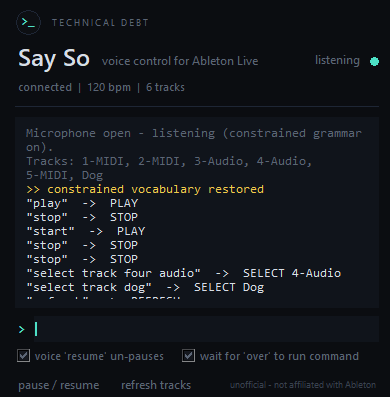
The recognizer only hears words it understands — plus your track names. When it mishears, type what you actually said and Say So learns the correction, improving accuracy on your voice over time.
Full Ableton Control
Transport, tempo, navigation, loop points, scenes, clips, mixer, sends, master, markers, record/takes, track colors, editing shortcuts — all on your voice. If Live has an API for it, Say So can say it.
Hands-Free Composing
Say a chord progression and Say So writes the M2TM Notes syntax, creates a clip, and types it in — all without touching the keyboard. "Make a MIDI clip on drums scene one, C major G major A minor each one bar."
Smart Track Renaming
Say "rename drums" — Say So switches to open vocabulary, asks for the new name, you speak anything, it renames and snaps the constrained grammar back on. One-shot "rename X to Y" still works for common words.
Plugin Loading
Say "put Operator on drums" or "add reverb to bass" — Say So selects the track and navigates Live's browser to load the plugin in one sentence. Live must be the active window for browser automation to work.
Live Track Sync
Track names are added to the vocabulary automatically whenever they change. Say "seven audio" to match Live's default naming. Say "refresh tracks" to force a re-read if names get out of sync.
Mic Gate & Hold Mode
Say "pause say so" (or "bye computer") before you sing and Say So stops listening — a descending audio cue confirms. Say "resume say so" or "hey computer" to bring it back. Toggle "wait for please" in settings and Say So buffers your words until you say "please" (or "over"/"done"/"finished"), giving you time to finish a longer phrase without accidental triggers.
Type to Teach
When Say So mishears a command, just type what you actually meant to say. It logs the correction, maps your voice to the right command, and gets more accurate on your accent and speech patterns over time. The more you correct it, the less you have to.
AbletonOSC + SaySoBridge
Say So uses AbletonOSC (UDP 11000) to send commands into Live. SaySoBridge (UDP 11002) is a second Control Surface that handles plugin loading, markers, Capture MIDI, sends/returns, and audio routing. A parallel keyword spotter runs alongside the main model so "play" and "stop" fire near-instantly even if the main recognizer mishears them.
Macros
Build trigger phrases that run multiple commands in sequence. Say "practice mode" and it loops 8 bars and turns the metronome on. Any combination of commands, any trigger phrase you want. Macros are saved and persist across sessions.
Ask It Anything
Say So can answer questions about your session. "What's the tempo?" "How many tracks?" "What's armed?" "What bar are we on?" "Read me the tracks." Answers are logged in the app and optionally spoken aloud.
Fully Offline & Private
Speech recognition runs locally via Vosk. Nothing you say leaves your computer — no internet connection needed after the one-time model download, no account, no API keys, no subscription. Fast, deterministic, and private.
Getting started
Install AbletonOSC
Download AbletonOSC (free) and drop it into your Remote Scripts folder. In Live: Preferences → Link/Tempo/MIDI → set a Control Surface slot to "AbletonOSC".
Windows: Documents\Ableton\User Library\Remote Scripts\
macOS: ~/Music/Ableton/User Library/Remote Scripts/
↗ Download AbletonOSC on GitHub
Install SaySoBridge
SaySoBridge ships inside the Say So download. Drop the SaySoBridge folder into the same Remote Scripts folder as AbletonOSC, then set a SECOND Control Surface slot to "SaySoBridge". Restart Live. Required for plugin loading, markers, Capture MIDI, and sends.
Run Say So
Double-click SaySo.exe (Windows) or SaySo.app (macOS). The first run downloads the Turbo speech model (~40 MB) automatically — one time only. The window shows download progress, then "connected | [bpm] | [n] tracks" when it finds Live. The model size can be changed to Balanced (~128 MB) or Accurate (~1.8 GB) in Settings.
Calibrate M2TM (optional)
To use hands-free chord composing, open a clip with the M2TM Notes text box visible, hover your mouse over it, and say calibrate. Remembered across sessions.
With SaySoBridge installed, "put Operator on drums" loads plugins directly. Keystroke features (M2TM typing, split, consolidate, save) require Live to be the active window. On macOS, grant Accessibility permission in System Settings → Privacy & Security. On Windows, if Live runs as admin, run Say So as admin too.
Everything heard is logged in the app. Type the command you actually meant into the > box and Say So learns the correction — improving accuracy on your voice over time.
Voice reference
Track commands accept a name ("drums"), a number ("track three"), or Live's default names ("seven audio" = 7-Audio). A command with no track named acts on the current selection.
TRANSPORT & SONG
| "play" / "stop" / "continue" | Transport — only the exact word fires (singing won't trigger) |
| "record" | Starts a take — say "stop" to end it (not a toggle) |
| "tempo one twenty eight" / "tempo up" / "tempo down" | Set or nudge BPM |
| "double time" / "half time" | Double or halve the tempo |
| "set time to six eight" | Change time signature |
| "metronome" | Toggle on↔off (uses Live's real state). Say "metronome on/off" to be explicit |
| "loop on" / "loop off" | Loop toggle — not a bare toggle, always say on or off |
| "link on/off" / "link sync on" | Ableton Link |
| "undo" / "redo" / "undo five times" / "undo everything" | Edit history |
| "metronome off play" | Command chaining — runs both in sequence |
NAVIGATION & LOOP
| "go to bar sixteen" | Jump to a bar number |
| "back four bars" / "forward two bars" | Relative navigation |
| "jump to start" | Return to bar 1 |
| "loop from bar four to bar eight" | Set loop start and end |
| "loop eight bars" | Loop from current position |
| "loop off" / "double the loop" / "halve the loop" | Loop adjustments |
| "launch quantize to one bar" / "free launch" | Clip launch quantization |
| "follow" | Toggle follow playhead |
NAVIGATE CLIPS & SCENES (NOTHING PLAYS)
| "next clip" / "previous clip" / "clip up" / "clip down" | Move the highlighted clip slot up/down — use to line up a slot for recording |
| "next scene" / "previous scene" / "go to scene 5" | Move the selected row — does NOT launch playback |
FIRE CLIPS & SCENES (THESE LAUNCH PLAYBACK)
| "fire clip" / "fire this clip" | Fire the ONE clip you're currently on |
| "fire all clips" / "fire the row" | Fire the whole row (launches the scene) |
| "fire this scene" / "launch scene three" / "fire scene 4" | Fire a scene row by name or number |
| "fire next scene" / "fire previous scene" | Move a row then fire it |
| "fire clip two on drums" | Fire one specific clip on a named track |
| "go to next scene and fire clips" | Move a row + fire the clip on current track |
| "go next and fire all clips" | Move a row + fire the whole row |
SCENES & CLIPS — OTHER
| "new scene" / "duplicate this scene" / "name this scene verse" | Create, copy, or name scenes |
| "stop all clips" / "stop drums" / "stop clips on keys" | Stop clips globally or per-track |
| "delete clip two on drums" / "delete this clip" / "delete this scene" | Remove clips and scenes |
| "name clip main riff" / "name this clip" | Name a clip |
MIXER
| "mute" / "unmute" [track] | Not a toggle — "mute" always mutes, "unmute" unmutes. No name = acts on whole selection |
| "mute everything but drums" | Inverse mute |
| "solo" [track] | Exclusive — solos ONLY the selection and clears all other solos. "unsolo" / "unsolo all" turn off |
| "solo drums and bass" / "solo everything except keys" | Multi-track solo |
| "arm" [track] | Exclusive — arms the selection and disarms everything else |
| "arm drums and bass" / "arm 1 2 3" | Arm several tracks |
| "arm all" / "solo all" / "mute all" | Act on every track |
| "arm none" / "unsolo all" / "disarm all" | Turn everything off |
| "volume up on bass" / "volume down track three" / "reset volume" | Nudge or reset fader |
| "set volume fifty on keys" | Set fader level (85 = 0 dB) |
| "pan left / right / center on keys" | Panning |
| "monitor off / auto / in on track two" | Monitoring state |
| "input from ext in on track two" | Input routing (experimental) |
| "audio to master on drums" | Output routing (experimental) |
SELECTION
| "select drums" / "select track two" | Select a single track |
| "select tracks two, three and four" | Multi-track selection in one breath |
| "select track" → then say numbers across pauses | Capture mode — lists over pauses, "and" before the last ends it instantly |
| "include bass" / "also select keys" | Add one track to the current selection |
| "deselect bass" / "exclude drums" | Remove one track from the selection |
| "next track" / "previous track" | Move selection up or down one track |
| "go to clip three" | Select that clip slot on the current track |
| "select master" / "select send a" | Select master or return tracks |
| "deselect" / "select none" | Clear selection |
SENDS & MASTER
| "select send a" / "select the reverb return" | Select a return track by slot or name |
| "mute send b" / "solo the reverb send" | Mute or solo a send |
| "turn down the master" / "set master to fifty" / "master up" | Master fader |
| "audio from track five" | Set selected track's input to another track |
TRACKS & DEVICES
| "new audio track" / "new midi track" | Create a track (auto-refreshes track list) |
| "rename drums" → say any name (or "cancel") | Two-step rename, open vocabulary |
| "rename track one to bass" | One-shot rename |
| "delete track three" | Delete track ("undo" restores it) |
| "change color to blue" / "set this track's color to red" | Color the current selection (17 colors) |
| "change color drums to blue" | Color a named track |
| "make them red" / "make drums blue" | Older color phrases — still work |
| "put operator on drums" / "add serum" | Select track + load plugin |
| "add instrument" → then say the name | Device-only listening mode for max accuracy — misheard names snap to nearest Ableton stock device |
| "bypass reverb on drums" / "enable reverb on drums" | Enable/disable a device |
| "remove reverb from drums" / "list devices on drums" | Delete device or read device chain |
| "refresh tracks" | Re-read track names from Live |
RECORD & TAKES
| "arrangement record on/off" / "automation on/off" | Arrangement recording and automation |
| "re-enable automation" | Re-enable automation after override |
| "capture that" / "capture and make a scene" | Capture MIDI (requires SaySoBridge) |
| "redo take" / "scrap the take" | Delete the last clip and re-record |
| "keep that" | Stop session record and keep the take |
| "keep last take" / "comp the last" | Comp Arrangement take lanes — keeps the newest lane, clears the earlier ones (requires SaySoBridge) |
MARKERS (requires SaySoBridge)
| "drop a marker" / "drop a marker called chorus" | Place a marker at the playhead |
| "mark this the drop" / "name this marker verse" | Name a marker |
| "next marker" / "previous marker" | Jump between markers |
| "go to the chorus" / "go to marker two" | Jump to a named or numbered marker |
| "delete this marker" / "delete marker three" | Remove a marker |
EDITING
| "split at playhead" / "consolidate" / "duplicate this clip" | Clip editing (Live must be focused) |
| "quantize" | Quantize selected clip |
| "group" | Group current Live selection (select tracks in Live first) |
| "session view" / "arrangement view" | Switch views |
| "save" | Save the Live set |
ASK
| "what's the tempo" / "what's the time signature" | Session info |
| "how many tracks" / "how many scenes" / "read me the tracks" | Count or list tracks and scenes |
| "what's selected" / "what's on this track" | Current selection and device chain |
| "what's armed" / "what's soloed" / "what's muted" | Mixer state readout |
| "what bar are we on" / "is it playing" / "what are the sends" | Playback and routing info |
MACROS & FUN
| Open Macros window → set trigger phrase + command list | Run multiple commands from one phrase |
| "panic" | Stop transport + kill all clips + disarm everything |
| "again" | Repeat the last command |
| "surprise me" | Random color on the selected track |
APP CONTROL
| "pause say so" / "bye computer" | Stop listening — plays a descending goodbye cue to confirm |
| "resume say so" / "hey computer" | Start listening again — plays a rising hello cue |
| "please" / "over" / "done" / "finished" | End a held command (when "wait for please" is on in settings) |
| "calibrate" | Remember M2TM text box position (hover mouse over it first) |
| "type it" | Type composed M2TM syntax into the box and hit Enter |
| "clear text" | Wipe the M2TM text box |
M2TM CHORD COMPOSING
| "make a midi clip on drums scene one, C major G major A minor each one bar" | Creates clip, types syntax, hits Enter — fully hands-free |
| "compose C major, D minor seven, G seven" | Any chord progression |
| "... each one bar" / "... each two beats" | Duration for all chords |
| "a C major chord for one bar then D minor for two bars" | Per-chord durations |
| "... each dotted quarter" / "in triplets" / "C major four times" | Rhythm variants and repeats |
| "notes C D E G each one beat" / "melody C octave four D E" | Single-note lines with octave control |
| "... then a rest for two beats" | Rests |
| "C major loud, G major softly" | Velocity (also "very loud" / "very softly") |
| "smooth ..." / "like a pianist" | Pianist voicings with voice leading |
| "C major over G" | Slash chord / bass note |
| "in the key of D major ..." | Key signature |
| "strummed C major G major" / "... slowly" / "strummed up" | Guitar-style strum feel and direction |
| "arpeggiate C major seven" / "... down" / "up and down" / "random" | Arpeggio with direction |
| "... in eighths" / "... over two octaves" | Arp speed and range |
| Chord qualities: major · minor · seven · major seven · minor seven · dominant seven · minor nine · nine · six · sus two/four · diminished · augmented · add nine · half diminished · power + sharp/flat | |
CHEAT SHEET
Say So — Command Reference PDF
All commands on one page. Print it or keep it open while you work.
AI REFERENCE
Say So — Manifest (for AI troubleshooting)
Upload this to an AI assistant for help troubleshooting. Contains the full technical reference — architecture, commands, known limitations, and fixes.
Details
| TYPE | Standalone Application (.exe / .app) |
| REQUIRES | AbletonOSC + SaySoBridge (both free), Ableton Live 10+ |
| PLATFORM | Windows & macOS |
| SPEECH | Local Vosk — Turbo (~40 MB default), Balanced (~128 MB), Accurate (~1.8 GB) — offline after first download |
| PROTOCOL | OSC via AbletonOSC (port 11000) + SaySoBridge (port 11002) |
| PRIVACY | Nothing you say leaves your computer |
| LICENSE | Free — unofficial, not affiliated with Ableton AG |
- Turbo model default (~40 MB) with Response speed selector: Turbo / Balanced / Accurate
- Parallel keyword spotter — "play" fires near-instantly even if the main model mishears
- Navigate vs. Fire distinction: "next scene" now moves only; say "fire next scene" to launch
- Selection capture mode — list tracks across pauses, "and" before the last closes it
- Solo is exclusive, mute/arm are not toggles — explicit and predictable
- Push-to-talk (F8), wake word (customizable), auto-arm on select
- Command word rebinding — set your own trigger word for any command
- "add instrument" device-capture mode for accurate plugin loading
- Keep last take / comp take lanes (requires SaySoBridge v3.7)
- "pause say so" / "bye computer" / "resume say so" / "hey computer" — audio cues confirm
- 13 UI themes: Dark · Midnight · Light · High Contrast · Warm · Nord · Dracula · Solarized · Rose · Forest · Cyberpunk · Mono · Ocean
- Live mixer strip — track state reflected in real time, click to add to selection
- Microphone gain slider, dynamic auto-leveling, built-in noise gate
- Macros seeded with defaults on first run
- Constrained speech recognition — vocabulary locked to known commands + track names
- Type-to-teach: type a correction and Say So learns it permanently
- Full transport, mixer, navigation, loop, scenes, clips, and marker control
- Multi-track selection, macros, ask commands, M2TM composing
- Plugin loading via SaySoBridge, pause/resume mic gate
- 5 accessible UI themes, Windows & macOS